
Google Workspace Marketplace


GPT for Sheets™ Docs™ Forms™ Slides™
GPT for Sheets™, Docs™ is an AI agent bringing ChatGPT 5.4, Claude, Gemini™, Perplexity, Open Router, and Grok to bulk tasks in Google Sheets™, with up to 400 prompts per minute and 200K rows at once
Listing updated:August 28, 2026
Works with:



1M+



Overview
GPT for Sheets™ Docs™ Forms™ Slides™ Gmail™ — #1 AI Add-on (1M+ Users) | ChatGPT, GPT-5.4, Gemini, Claude, Perplexity, GROK, DeepSeek, Open Router, Nano Banana, DALLE-3, Image models & 50+ AI Models in Google Workspace!

🔥 TRUSTED BY 1,000,000+ PROFESSIONALS WORLDWIDE 🔥

🚀 NEW! April 2026 Update:
• 💬 CHAT WITH YOUR SHEET™ — Like Cursor AI, but for Google Sheets™! Ask questions about data & edit with natural language
• GPT-5.4 & GPT-5.4 Pro — OpenAI's most powerful models
• Claude Opus 4.7 — Anthropic's latest & greatest
• Nano Banana Pro — Next-gen creative image generation model
• Imagen 4 models including imagen-4.0-fast-generate-001, imagen-4.0-generate-001 and imagen-4.0-ultra-generate-001
• O3, O3-Pro, O4-mini — Next-gen reasoning models
• Gemini 2.5 Flash & Gemini 3 Pro (Nano Banana Pro)
• Perplexity Sonar Pro & Deep Research
• Expanded provider support with OpenRouter, DeepSeek and Grok
• =GPT_WEB_SEARCH() — Real-time web search directly in Sheets™!
• =GOOGLE_INDEXING(url) — Instant Google Search indexing

━━━━━━━━━━━━━━━━━━━━━━━━━━━━━━━━━━━━━━━━

⭐ WHY 1 MILLION+ USERS TRUST US:

✅ 💬 AI Chat for Sheets™ — Chat with your data like Cursor AI! Natural language queries & edits
✅ 50+ AI Models — GPT-5.4, Gemini, Claude, Perplexity, Grok, DeepSeek & more
✅ FREE to Start — No API key required for trial
✅ Lightning Fast — 360 prompts/minute, 300,000+ rows bulk processing
✅ Real-Time Web Access — AI with live internet & Google search
✅ Image Generation — DALL-E 3, GPT-Image-1, 200+ Replicate models
✅ All-in-One — Works in Sheets™, Docs™, Slides™, Forms™ & Gmail™
✅ Enterprise Ready — Used by Fortune 500 companies

━━━━━━━━━━━━━━━━━━━━━━━━━━━━━━━━━━━━━━━━

💬 AI CHAT FOR GOOGLE SHEETS™ (Cursor Alternative):

Talk to your spreadsheet like you talk to ChatGPT!
→ "What's the average sales for Q4?"
→ "Highlight all cells above $1000 in green"
→ "Add a column with email domains extracted from column B"
→ "Sort by date and remove duplicates"

✦ Natural language questions about your data
✦ AI-powered cell editing & formatting
✦ Formula generation & explanations
✦ One-click undo for all AI changes
✦ Works like Cursor IDE — but for spreadsheets!

━━━━━━━━━━━━━━━━━━━━━━━━━━━━━━━━━━━━━━━━

📊 CORE AI FUNCTIONS FOR GOOGLE SHEETS™:

=GPT("write a tagline for", A1) — ChatGPT & GPT-5.2 in your cells
=GEMINI("summarize this", A1:B10) — Google Gemini™ AI
=CLAUDE("analyze sentiment", A1) — Anthropic Claude 4
=PERPLEXITY("research topic", A1) — AI with built-in web search
=GROK("explain simply", A1) — xAI Grok integration
=DEEPSEEK("solve this", A1) — DeepSeek reasoning AI
=MISTRAL("translate to French", A1) — Mistral AI
=OPENROUTER("any-model", A1) — Access 100+ models

🔍 WEB SEARCH & SCRAPING:
=GPT_WEB_SEARCH("latest AI news 2025") — Real-time search results
=GPT_WEB_ACCESS("current Bitcoin price") — Live web data access
=SERP("best project management tools", 20) — Google SERP in Sheets™
=WEB_SCRAPE(url) — Extract any website data
=WEB_TITLE(url), =WEB_DESCRIPTION(url) — SEO metadata extraction

🖼️ AI IMAGE GENERATION & VISION:
=GPT_CREATE_IMAGE("professional headshot") — DALL-E 3 images
=GPT_VISION(image_url, "extract text") — OCR & image analysis
=REPLICATE("flux-pro", "cyberpunk city") — 200+ image models

📈 SEO & CONTENT AT SCALE:
=SEO_BLOG("keyword", "professional", "English") — 1500+ word articles
=SEO_STRATEGY("target keywords") — Complete SEO roadmap
=SEO_OUTRANK(competitor_url) — Beat competitor content
=GOOGLE_INDEXING(url) — Force instant Google indexing

📧 EMAIL MARKETING & OUTREACH:
=SEND_EMAIL(to, subject, body) — Gmail™ bulk sending
=MAIL_MERGE() — Personalized campaigns (like YAMM, Gmass)
=MAILCHIMP_SEND() — MailChimp integration

📱 SOCIAL MEDIA AUTOMATION:
=LINKEDIN_POST(content) — Auto-post to LinkedIn
=TWITTER_POST(content) — Auto-post to X/Twitter
=INSTAGRAM_POST() — Social media at scale

🔗 DATA ENRICHMENT & LEAD GEN:
=APOLLO(domain) — Find business emails & contacts
=HUNTER(domain) — Email finder (Hunter.io)
=LEADMAGIC(linkedin_url) — LinkedIn data extraction
=PROSPEO(domain) — B2B lead enrichment
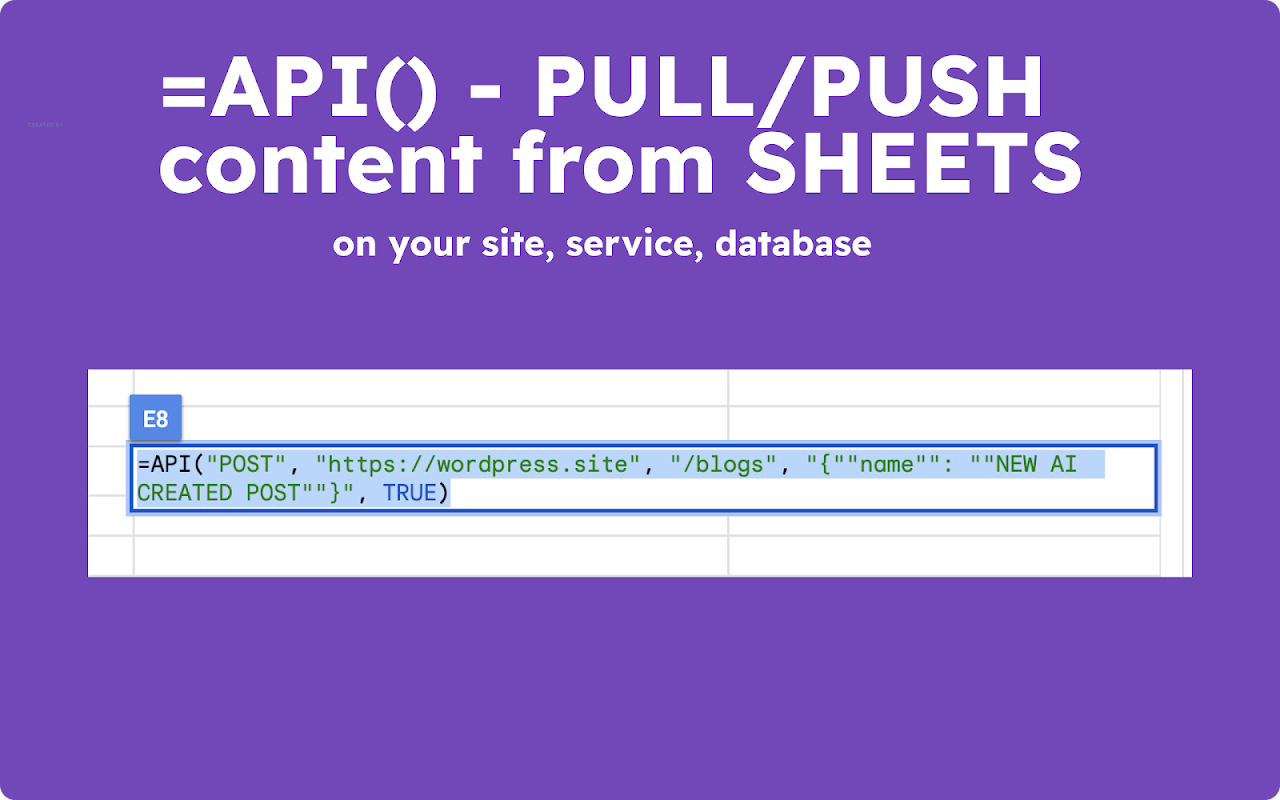
=API(method, url, params) — Connect ANY REST API

📺 YOUTUBE™ & GOOGLE MAPS™:
=YOUTUBE_SEARCH("keyword") — Find channels & videos
=YOUTUBE_CHANNEL_DATA(url) — Channel analytics
=GOOGLE_MAPS_PLACES("restaurants near NYC") — Local business data

━━━━━━━━━━━━━━━━━━━━━━━━━━━━━━━━━━━━━━━━

🤖 ALL SUPPORTED AI MODELS (Updated April 2026):

【OPENAI】
✦ GPT-5.4, GPT-5.4 Pro ⚡NEW
✦ GPT-5.2, GPT-5.2 Pro
✦ GPT-5.1, GPT-5, GPT-5 Pro, GPT-5 Mini, GPT-5 Nano
✦ GPT-4.1, GPT-4.1 Mini, GPT-4.1 Nano
✦ O3, O3-Pro, O3-Mini (Advanced Reasoning) ⚡NEW
✦ O4-Mini, O1, O1-Pro (Reasoning)
✦ GPT-4o, GPT-4o Mini, GPT-4 Turbo
✦ DALL-E 3, DALL-E 2, GPT-Image-1,
✦ GPT image models including gpt-image-2, gpt-image-1.5, gpt-image-1, gpt-image-1-mini and chatgpt-image-latest
✦ Nano Banana (Creative), Nano Banana Pro (Powerful)

【GOOGLE GEMINI™】
✦ Gemini 2.5 Flash, Gemini 2.5 Pro ⚡NEW
✦ Gemini 3 Pro Preview (Nano Banana Pro) ⚡NEW
✦ Gemini 2.0 Flash, Gemini 2.0 Flash Lite

【ANTHROPIC CLAUDE】
✦ Claude Opus 4.7
✦ Claude Sonnet 4.6
✦ Claude Haiku 4.5
✦ Claude 3.5 and Claude 3.7 compatibility support

【PERPLEXITY】
✦ Sonar, Sonar Pro ⚡NEW
✦ Sonar Reasoning, Sonar Reasoning Pro
✦ Sonar Deep Research

【MORE PROVIDERS】
✦ Grok & Grok 2 (xAI)
✦ DeepSeek Chat & DeepSeek Reasoner
✦ Mistral Large, Codestral, Pixtral
✦ Groq (Ultra-fast LLaMA)
✦ Open Router (100+ models gateway)
✦ Ollama (Run local AI models)

━━━━━━━━━━━━━━━━━━━━━━━━━━━━━━━━━━━━━━━━

💼 WHO USES GPT FOR SHEETS™?

【MARKETING TEAMS】
→ Generate 1000s of product descriptions instantly
→ Create SEO blog posts at scale
→ Write Google Ads™ & Meta ad copy in bulk
→ Social media content calendar automation
→ A/B test copy variations with AI

【SALES & LEAD GENERATION】
→ Enrich 10,000+ leads with Apollo, Hunter, Prospeo
→ Personalized cold email sequences
→ LinkedIn prospecting automation
→ CRM data cleaning & enrichment
→ Extract decision-maker contacts

【E-COMMERCE & AMAZON SELLERS】
→ Bulk product descriptions for Shopify/Amazon/eBay
→ Multi-language product translations
→ Review analysis & sentiment scoring
→ Competitor price monitoring
→ Category & keyword optimization

【SEO AGENCIES & CONSULTANTS】
→ Programmatic SEO (1000s of pages)
→ Meta titles & descriptions at scale
→ Content gap analysis with AI
→ SERP tracking & competitor analysis
→ Instant Google indexing for new pages

【DATA ANALYSTS & DEVELOPERS】
→ Connect any API directly in Sheets™
→ AI-powered data transformation
→ Automated report generation
→ Code generation & debugging
→ Webhook & automation workflows

【CONTENT CREATORS & AGENCIES】
→ Blog post outlines & drafts
→ YouTube script generation
→ Podcast show notes
→ Newsletter content
→ Translation & localization

━━━━━━━━━━━━━━━━━━━━━━━━━━━━━━━━━━━━━━━━

✅ GETTING STARTED (Easy Setup)

To get started with GPT for Sheets™, follow these steps:

1️⃣ Install the add-on (click "Install" button above)
2️⃣ Open Google Sheets™ spreadsheet (or Docs™, Slides™, Forms™)
3️⃣ Go to Extensions → GPT for Sheets™, Docs™, Slides™, Forms™ → 🚀 Launch
4️⃣ Start using AI functions like =GPT("your prompt here")

⚡ START IN 60 SECONDS — No API key required for free trial!

✨ No credit card required • No coding skills needed ✨

⚠️ IMPORTANT: If you encounter "Authorization is required to perform this action":
• Use a personal Google account (recommended)
• If using multiple Google accounts in Chrome, create a new browser profile and log in with only one account
• For Google Workspace™ users: Ask your admin to allow the add-on execution

━━━━━━━━━━━━━━━━━━━━━━━━━━━━━━━━━━━━━━━━

🎯 REAL RESULTS FROM REAL USERS:

"Replaced 3 different tools. Now I do everything in Sheets™!"
— Sarah M., Marketing Director @ Fortune 500

"Processed 50,000 product descriptions in 2 hours. Game changer."
— James L., E-commerce Manager

"Best investment for our SEO agency. ROI in the first week."
— Digital Marketing Agency Owner

"Finally, AI that works WHERE I work - in Google Sheets™!"
— Data Analyst, Tech Startup

━━━━━━━━━━━━━━━━━━━━━━━━━━━━━━━━━━━━━━━━

🆚 WHY CHOOSE US OVER ALTERNATIVES?

| Feature | GPT for Sheets™ | Others |
|---------|---------------|--------|
| 💬 AI Chat (Cursor-like) | Yes ⚡ | No |
| AI Models | 50+ models | 1-5 models |
| Bulk Processing | 300K+ rows | Limited |
| Web Search | Built-in | Not available |
| Image Generation | Yes | Rarely |
| API Integration | Full REST | None |
| Price | Affordable | Expensive |

Better than: Sheet AI, GPT for Work, Numerous AI, PromptLoop, Clay, Bardeen

━━━━━━━━━━━━━━━━━━━━━━━━━━━━━━━━━━━━━━━━

❓ COMMON QUESTIONS:

Q: Do I need an API key?
A: No! Start free without any API key. Add your own keys for unlimited usage.

Q: How many rows can I process?
A: Up to 300,000+ rows with bulk processing. 360 prompts per minute.

Q: Does it work with my company's Google Workspace™?
A: Yes! Works with personal & workspace accounts.

Q: Is my data secure?
A: Absolutely. Your data never leaves Google. Enterprise-grade security.

━━━━━━━━━━━━━━━━━━━━━━━━━━━━━━━━━━━━━━━━

🌐 RESOURCES & SUPPORT:

📍 Website: https://docgpt.ai
📍 Support: https://docgpt.ai/support/
📍 Tutorial (Sheets): https://youtube.com/watch?v=Bn6UzkrCaBs
📍 Tutorial (Docs): https://youtu.be/JBX45eiqe0w

━━━━━━━━━━━━━━━━━━━━━━━━━━━━━━━━━━━━━━━━

🔒 TRUST & SECURITY:

✓ 1,000,000+ installs
✓ 4.8+ star rating
✓ GDPR compliant
✓ SOC 2 security standards
✓ No data stored on our servers
✓ Enterprise approved

━━━━━━━━━━━━━━━━━━━━━━━━━━━━━━━━━━━━━━━━

🚀 JOIN 1 MILLION+ PROFESSIONALS TODAY!

Stop switching between ChatGPT and your spreadsheets.
Bring AI directly into Google Sheets™, Docs™, Slides™ & Forms™.

Install FREE now and transform your workflow!

━━━━━━━━━━━━━━━━━━━━━━━━━━━━━━━━━━━━━━━━

👍 TRY ALSO:

📄 Google Docs™ AI: https://docgpt.ai/google-doc-ai/
📊 GPT for Sheets™: https://docgpt.ai/gpt-for-sheets/
📝 GPT Quiz Generation in Google Forms™: https://docgpt.ai/quiz-maker-ai/
📽️ Google Slides™ AI: https://docgpt.ai/google-slide-ai/
📧 AI Email Assistant: https://docgpt.ai/ai-email-assistant/

━━━━━━━━━━━━━━━━━━━━━━━━━━━━━━━━━━━━━━━━

Google Docs™, Google Sheets™, Google Slides™, Google Forms™, Gmail™, Google Workspace™, Google Ads™, Google Maps™, YouTube™, and Gemini™ are trademarks of Google LLC. OpenAI, ChatGPT, GPT-4, GPT-5, DALL-E are trademarks of OpenAI. Claude is a trademark of Anthropic.
Additional information
sell
PricingFree of charge with paid features
code
Developer
Non-trader
email
Support
lock
Privacy policy
description
Terms of service
flag
ReportFlag as inappropriate



Search
Clear search
Close search
Google apps
Main menu